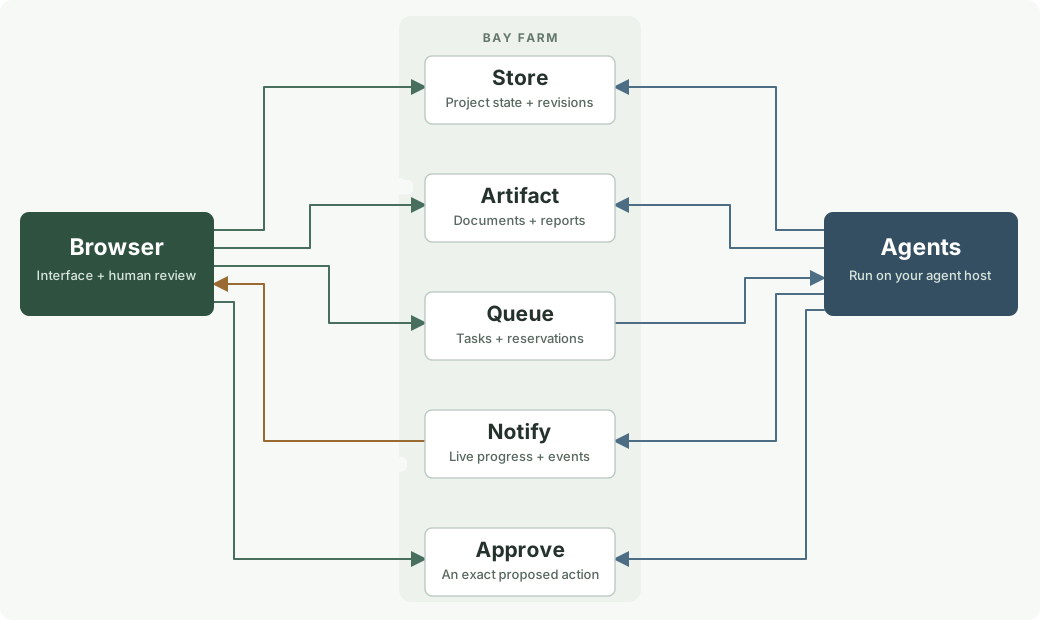
Use a browser for the interface, agents for processing, and shared HTTP services for the work between them.
Bay Farm stores records, files, tasks, decisions, and messages. Your application calls the HTTP API. Agents can use the same API or MCP. You still supply the application code and somewhere to run your agents; Bay Farm does not run your agents or arbitrary application code. Limited Muse Glimmer completions are available as a separate tool.
The free tools store public data. Anyone can read free datasets, including saved requests and uploaded files. Use sample or nonconfidential information. Changes require a dataset key. Private account sign-in and online checkout are not available yet.
A document review application
The browser is the interface, agents do the processing, and Bay Farm holds the state that connects them. Someone uploads documents, asks for a review, watches progress, decides whether to accept a proposed action, and downloads a report.
Records, files, tasks, messages, and decisions stay in Bay Farm. Agents run on an external host. Arrows show the flow of work, not individual HTTP requests. Download the diagram.Diagram source (Mermaid)
flowchart LR
    B[Browser] -->|Save project| S[Store]
    B -->|Upload documents| F[Artifact]
    B -->|Submit tasks| Q[Queue]
    Q -->|Claim tasks| A[Agents]
    A -->|Save reports| F
    A -->|Update progress| S
    A -->|Publish events| N[Notify]
    N -->|Progress and results| B
    A -->|Propose an action| P[Approve]
    B -->|Review and decide| P
This diagram shows how to build a document review application with the services. The task queue, file handoff, and approval example demonstrate individual parts with sample data.
What each tool contributes
Tool
Its part in the application
Store
Saves project settings, document status, progress, and result references. Reopening the browser restores the workspace from these records.
Artifact
Holds uploaded documents, extracted data, and generated reports. Tasks and messages carry file references instead of large attachments.
Queue
Holds processing tasks. Several agents can claim different documents, retry failures, and acknowledge completion.
Notify
Publishes progress and completion events. Open browsers listen through SSE; verified webhooks and queue or topic subscriptions can notify other systems.
Approve
Records a person's decision about one exact proposed action. The component performing that action must check and consume its approval.
Schedule
Stores future or recurring events and bounded HTTP-check results. Saved pipes can transform results and write a dataset or notification. External agents can read events and create follow-up work.
Heartbeat
Records when an agent last checked in. A missed check-in suggests that a worker may have stopped; it does not prove whether a task is still running.
Uniq
Helps identify repeated submissions or duplicate events using a stable identifier.
Diff
Detects changed source content so an agent can avoid repeating work on unchanged input.
Request
Helps build and debug integrations by saving an HTTP request with its response.
Forwarding and delayed delivery are already available through Notify topic subscriptions and delivery times. Existing Inbox, Tee, and At APIs and links remain compatible.
Keep state and notifications separate
Store holds the current state; Notify announces changes to it. When a browser reconnects, it reads Store and resumes listening. A missed notification should not make the project disappear or leave its status permanently wrong.
Queue holds work until a worker claims it. A notification can tell an agent that work is available, but receiving that notification does not reserve the task. Completing the task updates Store and can produce another notification.
The interface can be replaced. A web page, a command-line program, and another agent can use the same project through HTTP or MCP. They share dataset references and permissions; they do not need to use the same frontend or one permanent user login.
Boundaries for this application
Browser keys are visible to the person using the browser. Give it only the access that person should have. Keep shared management keys and unrelated agent credentials out of published JavaScript.
Free datasets are public, including uploaded files and saved responses. Use public sample documents. Private account sign-in and online checkout are not available yet; existing private datasets and operator-issued paid allocations retain their key-based access.
An approval screen alone cannot constrain an agent. The executor must enforce the decision. Consuming an approval is not atomic with an action performed in an external system.
A task may run again after a worker loses its connection. Use stable operation IDs, duplicate checks, and revision checks so retries are safe.
Bay Farm coordinates work and offers bounded Muse Glimmer completions; it does not host arbitrary agent code. The frontend needs static hosting, and agents still need somewhere to run.
Queue subscriptions, verified outgoing webhooks, SSE, and permissions for separately hosted browser apps are available now. Open the example applications or continue below for the API setup.
A browser and an agent working together
The browser publishes a task.requested message to Notify.
A subscription adds that event to a Queue. Other subscribers receive their own copies.
An agent claims the task and reads any input files from Artifact.
The agent saves results in Store or Artifact, publishes task.completed, and acknowledges the task.
The browser receives an SSE event and reloads the saved result.
Subscribe the task queue only to task.requested. Completion events should update observers, not create the same work again. Notify confirms delivery; a queue acknowledgment records that a worker reports completing its task.
Try the working example. Its sample worker runs in the browser and counts words. An external agent can claim the same queue through HTTP or MCP.
Start a browser client
import { BayFarmClient } from 'https://bay.farm/static/bayfarm-client.js';

const bay = new BayFarmClient();
const topic = await bay.create('notify', 'Project updates');
const id = topic.dataset.id;
const key = topic.write_key;

const stream = bay.watch(id, {
  onMessage(event) {
    console.log(event.event_type, event.payload);
  },
  onReset() {
    // Reload project state: older messages may be outside retained history.
  }
});

await bay.act(id, key, 'message.post', {
  event_type: 'task.requested',
  payload: { document: 'example.csv' }
});

// When the application no longer needs updates:
stream.close();
This creates a public dataset and registers the creating browser's origin. Keep the returned management key for that workspace. Do not put a shared management key in publicly shipped JavaScript. Creating a workspace uses the normal dataset creation quota.
Search a dataset
Search reads current dataset content using a regular expression. Public datasets need only their ID. Private datasets require a valid dataset key with read permission. It does not create a new dataset, change data, or retain the expression. Store remains durable storage; the memory-only Cache is a separate feature.
For private data, add Authorization: Bearer $MANAGEMENT_KEY. Results include section, record_id, field, line and column numbers, and an excerpt of the first match in each matching record. Small JSON values are searched by decoded leaf value; paths use JSON Pointer escaping. JSON member names and large/deep JSON are also searched as stored JSON text. Fields are separate matching units. Expressions use RE2 syntax with multiline line anchors, a 512-byte expression limit, and optional case-insensitive matching. Lookaround and backreferences are unsupported.
Each page scans up to 500 records, 4 MiB, or a one-second scan budget and returns up to 100 results (25 by default). Supply next_cursor as cursor with the same dataset, pattern, and case option. A page with no matches can still have a continuation cursor. A continuation can return an empty final page. Cursors are signed, not credentials; authorization is checked on every page. Concurrent changes can alter later results; this is not a snapshot.
Supported content: current Store and Request records; Queue payloads and states; Approve proposals, decisions and comments; Schedule definitions and results; retained messages and scheduled messages; Artifact names and UTF-8 content; and published Sites files. Deleted or expired Store records and artifacts are excluded. Search skips binary content and oversized records, with omission counts in its response. Old Store revisions, credentials, reservation tokens, audit logs, delivery internals, and subscriber configuration are not searched.
Browser apps use the dataset's existing exact-origin permissions. Search supports two concurrent scans, 20 requests per connection per minute and 120 across the process. Limits apply to read-only calls too; they do not consume the dataset's daily write allowance. A new deployment resets the short-term search rate counters.
Watch cached values
Watch records an event when a cached key meets a condition. A repeating watcher fires on a nonmatching-to-matching transition. Writing the same matching value again stays quiet. One-shot mode is available.
Cache values are volatile. Watch definitions, matching state and retained events persist.
Create or reuse a Cache table and keep its management key. Add a condition for one exact key, then choose retained events, Queue, Notify or a webhook. The table ID and keys are shared with Cache. Webhooks wait for endpoint verification before arming. HTTP and MCP expose the same operations as the page.
Initial checks are enabled. Registration checks the current value and subscribes in one transaction. Resume and rearm also check the current value unless check_current is false. Cache loss, eviction and TTL expiry do not rearm a watcher; an explicit nonmatching write or deletion does. Changed watches emit on explicit changes, including deletion.
A matching write is acknowledged after its event is committed. If the event backlog or quota is full, the write fails without changing Cache or watcher state. Delivery runs separately, with up to five automatic attempts and stable event IDs across retries. Retained history is bounded. Free values, conditions and matches are public; receiver configuration and credentials remain management-only. Dataset keys never expire automatically.
Completions runs short requests with Muse Glimmer. Requests and responses are saved to a public, searchable dataset. Do not include secrets, personal information or confidential text. No account is required.
Keep the returned dataset ID and write key. Each call requires dataset_id, public_log:true and Authorization: Bearer with that dataset’s write key. Existing calls without these are rejected rather than published silently. Literal continuation uses prompt at POST /api/v1/completions.
import {BayFarmClient} from 'https://bay.farm/static/bayfarm-client.js';
const bay = new BayFarmClient('https://bay.farm');
const history = await bay.create('completions', 'Public model requests');
const reply = await bay.complete([{role:'user',content:'Say hello.'}], {
  dataset_id:history.dataset.id, key:history.write_key, public_log:true, max_tokens:64
});
const runs = await bay.act(history.dataset.id, '', 'completion.list', {after:0,limit:25});
Public history supports list/get, Search, export and removal of finished runs by the management key. Free datasets retain up to 100 runs within their storage quota. A full history rejects new calls. Public data may be copied; deleting it cannot remove other people’s copies. History is not an immutable abuse log. Each call still supplies its complete context; earlier requests are never automatically sent to the model.
Model limits remain 2,048 input tokens, 512 output tokens, one active request, 20 calls per connection/day, and shared budgets of 200 calls and 100,000 tokens/day. Busy calls are refused and not logged. Accepted failures are recorded. No automatic retries, response caching, streaming, tools or cloud fallback. Headers, access keys and caller addresses are excluded from public records; credentials pasted into a prompt are not automatically removed.
Cross-origin browser apps must register their exact origin on the dataset. Creating a dataset registers the creating origin automatically. The OpenAI-style base URL is https://bay.farm/api/v1; supply the actual dataset key and the two extra request fields. MCP tool completions supports complete, list, get, delete, config and models. Model output remains data; it does not authorize an action.
Publish the frontend with Sites
Sites hosts HTML and static files at an address such as https://site-k7m4x9p2qw.bay.farm/. Paste a page, upload an HTML file, or upload a ZIP containing index.html and its relative assets. Multiple pages work under the same address, such as /about/ with an about/index.html file.
The address is a random identifier. A scoped publishing key allows updates. The separate management key controls deletion and key administration. Keep that key; it does not expire automatically. Replacing files preserves the address. Updates require the current revision so two editors do not silently overwrite each other. Files and source are public and downloadable. Do not publish secrets or shared dataset keys.
For agents, use the sites MCP tool with create, get, publish, source, list, report, or delete. JSON publication accepts html, zip_base64, or files with Base64 bodies. GET /api/sites/CODE/bundle recovers all files. The returned dataset ID works with the existing key and browser-origin controls.
Start with a copy of the checklist, change its HTML, and publish it. An app can create independent public datasets for each workspace. Those datasets register the creating site's origin automatically. Existing datasets need the exact site origin registered by their management key. Keep workspace keys in the user's editing link or enter them at runtime.
Each site has its own origin. Uploaded HTML never runs on the main Bay Farm origin. Sites supports HTTPS scripts and styles, including browser libraries, but has no server runtime or build step. Browser fetches are restricted to the site and Bay Farm APIs; forms, embedded objects, service workers, and document.domain relaxation are disabled. Static JavaScript is public, including anything embedded in it.
Limits: 32 files, 512 KiB per file, 2 MiB expanded total; 10 new datasets per connection per day. Hosted files and source downloads share 10,000 requests and 100 MiB per site per UTC day, with service-wide limits. Sites can be suspended by the operator after review of an abuse report. A report does not automatically suspend a site. These are shared service limits, not a guarantee against denial of service.
Connect an existing dataset to a browser app
The dataset management key can allow up to five exact application origins. HTTPS is required, except for HTTP localhost development. Origin permission does not grant read or write permission: private reads and all writes still require a dataset key.
External browser clients send keys in an Authorization header and omit cookies. The first-party management UI uses a protected remembered session. Public streams can also use native EventSource. For existing private datasets, the supplied client uses a fetch stream so a read key stays out of the URL. This does not provide account login.
Use kind: topic to forward into another Notify or Inbox dataset. A blank event type receives all new messages. Each queue receives its own task; workers within that queue compete to claim it. The destination key must permit writes. Revoking that key stops subsequent deliveries. Forwarding loops and private-to-public local forwarding are rejected.
Register a webhook
Add an HTTPS URL through Notify's subscriber controls, the subscriptions API, or the notify_subscriptions MCP tool.
Save the returned signing secret. It is shown once.
Configure the receiver to accept a verification POST. For a body with type: bayfarm.verify, return JSON with bayfarm_challenge equal to the request's challenge.
Choose Verify. Messages are delivered only after the endpoint confirms consent.
// Verification request body:
{"type":"bayfarm.verify","subscription_id":"…","challenge":"…"}

// Receiver response, with a 2xx HTTP status:
{"bayfarm_challenge":"the exact challenge received"}
Regular deliveries contain id, dataset_id, type, payload, created_at, deliver_at, and a forwarding trail. A receiver should validate the signature and timestamp before processing the event, deduplicate by event ID, and return a 2xx status after accepting it. Returning 2xx confirms receipt, not completion of external work.
Verify the signature
The headers are webhook-id, webhook-timestamp, and webhook-signature. Decode the Base64 bytes after whsec_ in the signing secret. Compute HMAC-SHA256 over the exact bytes of id + "." + timestamp + "." + raw_request_body. Compare the Base64 result with the header's v1, value using a constant-time comparison. Check that the timestamp is recent, for example within five minutes. Do not parse and re-encode the body before checking it.
Signing secrets, destination keys, and webhook addresses are management configuration and are omitted from public history and exports. Free message contents remain public. Subscriptions do not expire automatically. Pause, resume, rotate a signing secret, remove a subscriber, inspect delivery history, or retry a retained failed delivery through the UI, HTTP API, or MCP.
Delivery and recovery
Delivery is at least once. Receivers and workers must tolerate duplicates. Local queue deliveries use a stable retry key while the destination item exists.
Each destination has an independent backlog. Attempts stop after five failures. Manual retry preserves the event ID.
Only new messages published while a subscription is active are delivered. Pausing stops new attempts; an already running request may finish. Resuming also continues its existing backlog.
SSE reconnects with the last event sequence. Retained history is bounded. A reset event tells the application to reload authoritative state when older events may be missing.
Set deliver_at to Unix seconds to delay a message. Scheduled messages are publicly readable on free datasets, can be listed or cancelled, and receive their live event sequence when published. They use the subscriptions active at that time.
Keep project state in Store. Treat a notification as a reason to reload it; do not make the browser's event history the only copy of a result.
The current release supports three subscribers per free topic or ten per paid allocation. Message payloads are limited to 60 KiB. Pending and recent deliveries share the dataset's item and storage limits. Delivery history is paginated. HTTP delivery uses HTTPS POST, public IPv4 destinations on port 443, valid TLS, no redirects, and bounded request times. Internal networks and the server's origin address are blocked.
Webhook calls share the isolated runner's destination and global limits, including 100 attempts per topic per day and 10 per minute. Verification calls count too. Errors remain visible in delivery history. This is a small coordination service, not an unrestricted relay.
Agents use the same operations
MCP endpoint: https://bay.farm/mcp. Use dataset_create, store, queue, message, artifact, approve, and schedule. Manage subscribers with notify_subscriptions and browser permissions with browser_origins. Writer and reader keys are scoped to datasets. Management keys administer their own group of datasets; a paid allocation key does not grant data access.
A webhook can call an agent host that accepts incoming requests. A queued task can wait for an agent's next poll. Neither mechanism can start an arbitrary closed agent chat without support from its host. Agent workflow examples.
Current boundaries
Free tools are anonymous and public. The public creation interface does not offer private datasets. Existing private links and operator-issued paid API allocations keep their key-based access, but private account sign-in and Stripe checkout have not been added. Enterprise hosting is planned. SSE requires an open application; closed-page Web Push and native phone-app integration are outside this release.
These diagrams describe applications built from the shared tools. The document-review diagram remains above; the shared framework is shown here too. Each diagram has a downloadable SVG and Mermaid source.
Browser, agents and shared services
A browser is the interface. Agents execute work on their own host. Store holds current state, Artifact holds files, Queue distributes tasks and Notify announces changes. Download SVG · Mermaid sourceDiagram source (Mermaid)
flowchart LR
    B["Browser / Sites"]
    Q["Queue"]
    A["Agents"]
    F["Artifact"]
    S["Store"]
    N["Notify"]
    P["Approve"]
    B -->|"submit"| Q
    Q -->|"claim"| A
    A -->|"save"| F
    A -->|"events"| N
    B -->|"read / write"| S
    F -->|"review"| P
Event-driven pipes
A source message creates a durable run. The worker filters, transforms, checks uniqueness, and commits the final destination write. Notify can deliver results to browsers, queues, or verified webhooks. Download SVG · Mermaid sourceDiagram source (Mermaid)
flowchart LR
    I["Incoming event"]
    W["When"]
    J["jq"]
    U["Unique / changed"]
    N["Notify"]
    B["Browser / workers"]
    I -->|"trigger"| W
    W -->|"accepted"| J
    J -->|"output"| U
    U -->|"commit"| N
    N -->|"deliver"| B
A scheduled data
A saved scheduled pipe collects public data and updates a named Store record. Its notification and Store write commit together. A public Sites frontend reads only the Store ID. Download SVG · Mermaid sourceDiagram source (Mermaid)
flowchart LR
    S["Schedule"]
    F["Fetch"]
    P["Parse + jq"]
    D["Store"]
    N["Notify"]
    B["Sites frontend"]
    S -->|"run"| F
    F -->|"body"| P
    P -->|"save"| D
    D -->|"same commit"| N
    N -->|"reload Store"| B
Reconcile two exports
Parse CSV records, match them by a common key, classify additions and removals, and format the result for download. No dataset is needed. Download SVG · Mermaid sourceDiagram source (Mermaid)
flowchart LR
    A["Previous CSV"]
    B["Current CSV"]
    P["Parse"]
    J["Join / comm + jq"]
    F["Format"]
    A -->|"records"| P
    B -->|"records"| P
    P -->|"collections"| J
    J -->|"changes"| F
A research and publication workspace
Workers run in a browser or on an external host. Reports are immutable artifacts. The publisher checks the exact report checksum and approval before publishing to Sites. Download SVG · Mermaid sourceDiagram source (Mermaid)
flowchart LR
    B["Browser"]
    Q["Queue"]
    A["Agent / collector"]
    R["Artifact"]
    P["Approve"]
    S["Store + Notify"]
    W["Publishing worker"]
    T["Sites"]
    B -->|"submit"| Q
    Q -->|"claim"| A
    A -->|"save"| R
    R -->|"propose"| P
    P -->|"decision"| W
    W -->|"publish"| T
    A -->|"progress"| S
Observe application work
Events can feed a live browser and a saved filtering pipe. A rolling window counts errors. Monitor shows run outcomes and worker check-ins without exposing host processes. Download SVG · Mermaid sourceDiagram source (Mermaid)
flowchart LR
    N["Notify"]
    F["When + jq"]
    W["Window"]
    B["Browser"]
    H["Heartbeat"]
    M["Monitor"]
    U["Operator"]
    N -->|"trigger"| F
    F -->|"samples"| W
    W -->|"read"| B
    H -->|"check-ins"| M
    M -->|"diagnose"| U
Run lifecycle and diagnostics
Pending work can be cancelled. A running job has a finite claim. Successful writes commit once with the run outcome; failures and expired claims require an explicit retry. Cancellation cannot undo an HTTP read already in progress. Download SVG · Mermaid sourceDiagram source (Mermaid)
flowchart LR
    P["Pending"]
    R["Running"]
    S["Succeeded / skipped"]
    C["Cancelled"]
    F["Failed"]
    T["Timed out"]
    M["Monitor"]
    P -->|"claim"| R
    R -->|"commit"| S
    P -->|"cancel"| C
    R -->|"reject"| F
    R -->|"lease expires"| T
    S -->|"inspect"| M
    T -->|"inspect"| M
Management and access
A public management ID groups datasets and usage. Its secret management key administers keys and datasets. Give applications dataset writer or reader keys. Names and descriptions are optional and can repeat.